
PIFRA Registration Form


Fill out the PIFRA registration form to start getting your PIFRA salary slip online. Your PIFRA registration is very necessary if you want to get the PIFRA payslip in your email every month.
If you have started your career as a government employee, you need to have a PIFRA account to get the details of your wage like the date of the salary issue, the amount of salary, and taxes added to your salary, etc.
This beginner’s guide will let you through the complete process of signing up for an account with PIFRA and receiving your monthly payslips online.
PIFRA Registration Form PDF Download Online
First, you need to download the PIFRA registration form as a PDF file. The form will allow you to fill out your employee details and register an employee account online.
Click on the button below to download the PDF form from this website.
Form
How to Do PIFRA Registration Online for Government Employees?
If you are a new government employee and you need to get your monthly payslip via email then you have to complete your registration with PIFRA.
PIFRA stands for Project to Improve Financial Reporting and Auditing. It is a department that handles all the salaries of government employees. That is why when you need to obtain the payment slip, you have to register an account online with PIFRA first.
Follow this step-by-step guide to PIFRA registration:
Visit www.pifra.gov.pk for Pay Slip Registration Online
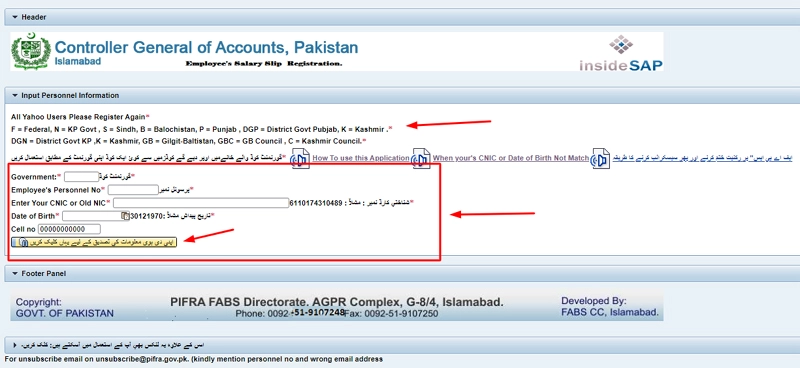
You need to start your registration online by visiting the PIFRA official website at www.pifra.gov.pk. On this page, you will see the PIFRA registration form that you need to fill out.
Fill Out the PIFRA Registration Form for the Monthly Salary Slip
Now, fill out the registration form with your valid details. You need to fill in the following details:
- Government Code (گورنمنٹ کوڈ)
- Employee’s Personnel No (پرسنل نمبر)
- Enter Your CNIC Number (شناختي کارڈ نمبر)
- Date of Birth (تاريخ پيداش)
- Mobile Number
Get Your Government Code
If you are confused about your government code, then I have added all the codes for you. Choose the code according to your province.
| Government Code | Province |
|---|---|
| F | Federal |
| K | Kashmir |
| GB | Gilgit Baltistan |
| GBC | GB Council |
| DGN | District Govt KP |
| N | KP Govt |
| C | Kashmir Council |
| K | Kashmir |
| DGP | District Govt Punjab |
| S | Sindh |
| B | Balochistan |
| P | Punjab |
Verify Your Details
Now you have to check if your details are accurate or not. To do this, you need to click on the yellow button with the text “اپنی دی ہوئی معلومات کی تصدیق کے لیے یہاں کلک کریں“.
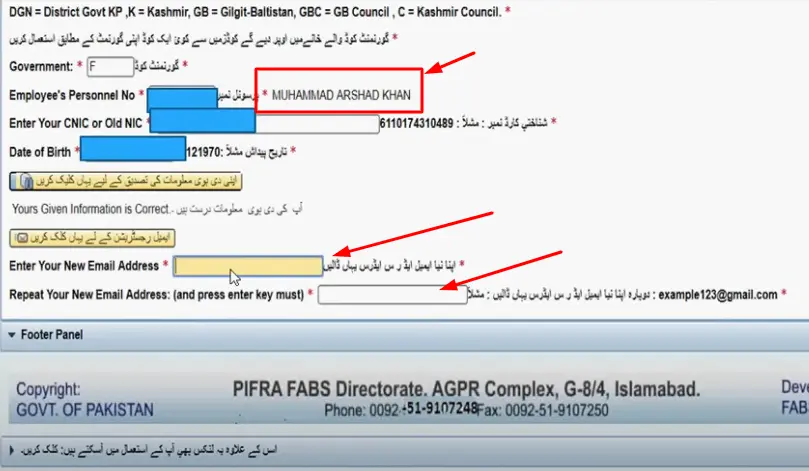
This will show you a message “آپ کی دی ہوئی معلومات درست ہیں” if your personal details are correct. If there is an error, you need to fix it by contacting the DDO.
Register Your Email in PIFRA
Now you need to click on the button with the text “ای میل رجسٹریشن کے لیے یہاں کلک کریں” and enter your new email address where you want to receive your salary slip. Once you added your email, click the “Enter” button and that’s it. Your PIFRA salary slip registration will be completed now.
What To Do If My Date of Birth or CNIC is not a match in the System?
Sometimes, you may face the issue that your CNIC or date of birth is not correct or does not match in our system. However, you do not need to worry as it is not a big issue. The problem was issued due to an incorrect ID card number or date of birth in the PIFRA database.
You can solve this issue simply by the following these steps:
- Make a call on 9107248 or 9107209 from your phone.
- Now tell the representative agent that your CNIC or date of birth does not match with the PIFRA system.
- The agent will forward your request to the DDO officer, who will correct your details in the database.
- Once your details are corrected, you can try again to dothe PIFRA pay slip registration.
How to Download PIFRA Salary Slip by CNIC?
I have already published a detailed article on the PIFRA salary slip download. You can check that article to know about it in depth. However, the short process is to visit the email address that you have added to the PIFRA.
Now check the email from PIFRA and open it. You can download this email that contains your salary slip. There will be a PDF file enclosed in the email that you can download.
F.A.Q
How can I register with Pifra?
You need to visit the PIFRA website and fill out the registration form with your details.
How to register email in PIFRA?
Visit www.pifra.gov.pk and enter your Gmail email address in the registration form.
Can I use the Yahoo email for PIFRA registration?
No, you can not use Yahoo email as Pifra only allows Gmail emails.
How to do a PIFRA login?
Enter your employee number and CNIC number to log into your account.
How to download salary slips online from Pifra?
To download the Pifra salary slip, you need to open the email inbox that you used during the registration. Now find out the Pifra emails and download the salary slip.
What is the employee’s personal number?
The employee’s personal number is a unique ID or code assigned to every government employee in Pakistan. You can get your employee number on your salary slip.
What is the government code for salary slips?
The government code is a unique code dedicated to each province in Pakistan. It is like F for Federal, N for KP Govt, S for Sindh, and B for Balochistan
How to unsubscribe Pifra pay slip?
To unsubscribe from the Pifra pay slip, you need to send an email to “[email protected]”.

Written By


My father is job is Federal government pakpwd send me slip buldiers
i have been registered in pifra but my slip of the month of MAY is not sent on my email address. why????
one thing is that , in my email address all alphabets are small letters.
Why you (pifra) show my email address in capitals letters??
I registered my email address with small alphabets letters
[email protected]
Meri siry silp nhi mile August ki
i have been registered my email address but now i had forgotten my email address please now i want to reset my emil adress to receive my salary slips pleasew guide
new email [email protected]
old email [email protected]
please Contact me on this mobile No. 03339172879 for guidance
I am Syed mukhtar Hussain belong to district skardu baltistan . I need my salary slip for the month of September 2025 . My email address is [email protected]
Pfira.gov.pk is not working. Please guide further or send any link. (For registration)
Need November salary slip
I need salary slip of last month November 2025
I need my salary slip November 2025
My salary slip not received from last 3 month on my g. Mail account ta7791113@gamil.
Aftab ahmed near Mutazavi Masjid mohni bazar NawabShah
November ki slip receive nhi hoi h abhi tak
I can not receive salary slip for the of november2025 please send mw.